Aldryn SSO (authentication)
Authentication to the Divio platform, and (by default) to user projects running on the platform, is handled by the Divio SSO (single-sign-on) system. This provides a convenient way to authenticate users for Divio projects (whether locally, or on the Test or Live servers) without needing to log in again, as long as they have logged into the Divio Control Panel.
This includes making it possible for users working on projects locally to log in locally with a single click, as they have already been authenticated.
Divio SSO is managed by the open-source Aldryn SSO addon. The system is optional, but is installed by default in all Divio Django projects.
If the addon is uninstalled, then Django’s standard authentication behaviour will apply.
Login methods
The Aldryn SSO addon provides three different login methods to Divio projects:
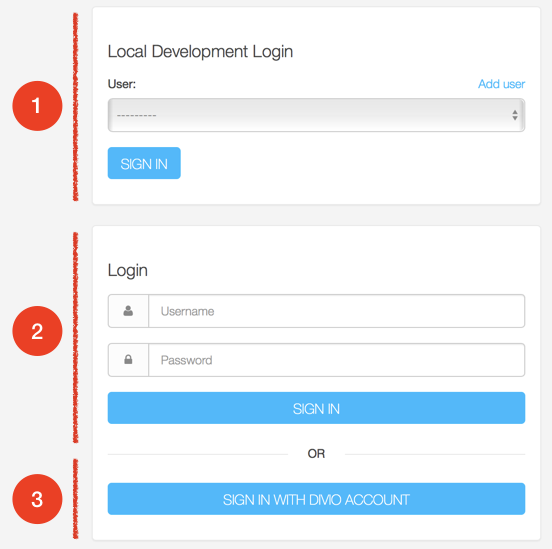
Depending on how the project is configured, and which environment (local/test/live) it’s running in, different combinations of these options will be shown (you’ll never see all three at once in a real project).
The illustrated options are:
1. Local development login
This is intended to appear on locally-running projects only. The Add user option is a convenient way to add new users to a project.
2. Django’s standard username/password login form
This will not be of any use unless users with passwords exist in the database.
3. Divio single-sign-on
This is intended to appear on projects running in Cloud environments only. It allows users to sign in to their own projects with a single click, once they have authenticated with the Divio control panel.
Test site protection
By default the Test site is protected so that it’s not publicly discoverable or viewable. Only the owner or an authorised user of the project can view its contents.
This is controlled with the ALDRYN_SSO_ALWAYS_REQUIRE_LOGIN environment variable, which is True by default and can be overridden by setting it manually.
See also how to apply/remove password protection to Django sites.
Aldryn SSO configuration options
Important
The preferred way to set these options is as environment variables.
If you supply them as Django settings declared in settings.py, they must appear before
aldryn_addons.settings.load(locals()). This allows them to be processed correctly by the addons system.
The exception is ALDRYN_SSO_HIDE_USER_MANAGEMENT, which is configured via the Control Panel, or by adding the
variable after aldryn_addons.settings.load(locals()).
More details of how Aldryn SSO processes these settings can be studied at aldryn-sso.aldryn_config.py.
ALDRYN_SSO_ALWAYS_REQUIRE_LOGIN
Controls whether visitors need to be logged-in. Available options are:
True: Users will need to log in via the SSO system in order to access the site (default for test site).False: No login is required (default for local and live environments).basicauth: The site will be protected by basic HTML access authorisation. See basicauth.
Can also be specified as an environment variable or in settings.py.
ALDRYN_SSO_ENABLE_LOCALDEV
Enables Local development login.
When True (default for the local environment only) enables the Add user
pane in the login form, providing a convenient way to add a new user to the
database.
Can also be specified as an environment variable or in settings.py.
Warning
For obvious reasons, enabling this is strongly not recommended on the Test and Live sites, and there is generally no good reason to manipulate this setting.
ALDRYN_SSO_ENABLE_SSO_LOGIN
Enables single-sign-on.
Requires a value to be present in SSO_DSN, and is automatically set when
there is. If enabled when no SSO_DSN value has been set, an error will be
raised.
Can also be specified as an environment variable or in settings.py.
ALDRYN_SSO_ENABLE_LOGIN_FORM
Enables Django’s standard username/password login form.
By default, is enabled when Hide user management is not enabled.
Can also be specified as an environment variable or in settings.py.
ALDRYN_SSO_ENABLE_AUTO_SSO_LOGIN
When True (the default on all sites) then if SSO login is the only login
method enabled, the user will be automatically logged-in via SSO (assuming of
course that the user is authorised to do so).
The logic for this condition is:
ALDRYN_SSO_ENABLE_SSO_LOGIN |
True |
ALDRYN_SSO_ENABLE_AUTO_SSO_LOGIN |
True |
ALDRYN_SSO_ENABLE_LOGIN_FORM |
False |
ALDRYN_SSO_ENABLE_LOCALDEV |
False |
Can also be specified as an environment variable or in settings.py.
ALDRYN_SSO_HIDE_USER_MANAGEMENT
This option is presented in the configuration form for the Aldryn SSO addon on
the Control Panel (as Hide user management). Its effect is to unregister the
User and Group models in the Django admin.
Setting it as an environment variable will have no effect.
Specifying it in settings.py will only have an effect if it is declared
after aldryn_addons.settings.load(locals()). This is not recommended
except for testing purposes.
For local testing, the hide_user_management value in
aldryn-addons/aldryn-sso/settings.json can be changed, mimicking the
effect of the form value.
Basic access authentication
Basic access authentication is configured using ALDRYN_SSO_BASICAUTH_USER and ALDRYN_SSO_BASICAUTH_PASSWORD.
When ALDRYN_SSO_ALWAYS_REQUIRE_LOGIN is set to basicauth, access to
the entire site will require user and password details. This is an additional
layer of authentication. Access to the admin will still require login by an admin user, and even a logged-in admin user will need to supply the username
and password.
See also
Though the username and password can be specified as an environment variable or
in settings.py, the latter is not good practice.
SSO_DSN
The Data Source Name for single-sign-on.
This is set as an environment variable automatically in Cloud Projects, adding the SSO authority to the URL configuration for the project.
If you are providing your own single-sign-on, SSO_DSN can also be specified
as an environment variable or in settings.py.
LOGIN_REDIRECT_URL
After login, redirect to the specified URL (by default, to /).
Specifying LOGIN_REDIRECT_URL in settings.py will only have an effect if
it is declared after aldryn_addons.settings.load(locals()).
ALDRYN_SSO_LOGIN_WHITE_LIST
A list of internal endpoints that don’t require authentication. Defaults to an empty list.
For example:
from django.core.urlresolvers import reverse_lazy

ALDRYN_SSO_LOGIN_WHITE_LIST = [reverse_lazy('my_whitelisted_endpoint')]
Can be specified as an environment variable or in settings.py, or
manipulated programmatically in other applications:
if 'ALDRYN_SSO_LOGIN_WHITE_LIST' in settings:

    settings['ALDRYN_SSO_LOGIN_WHITE_LIST'].extend([reverse_lazy('my_whitelisted_endpoint')])
ALDRYN_SSO_OVERIDE_ADMIN_LOGIN_VIEW
We override Django’s admin login view by default, as long as one of the three login options is enabled. This takes better care of logged-in users who are not staff (admin) users.
The standard Django administration login view is available by setting this to
False as an environment variable or in settings.py.